![Main Logo White.svg]](https://support.affirmativeusa.com/hubfs/Main%20Logo%20White.svg)
Introduction
Welcome to the Transactions screen. This screen allows you to search for any outgoing or incoming items that have been loaded into the system.
When the screen first loads, no transactions will be displayed. To begin, enter search criteria in the filter area.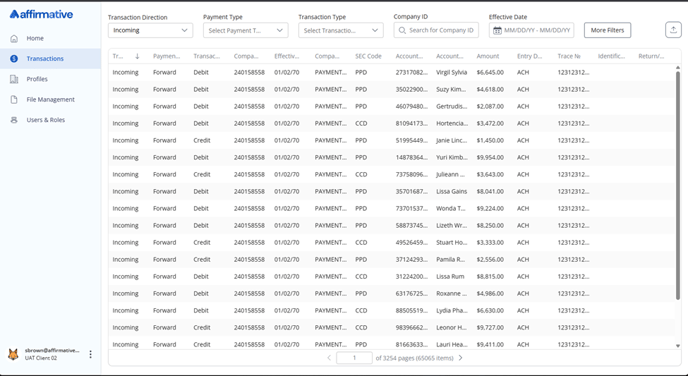
Available Filters
The system offers a wide range of filters to help you quickly narrow your transaction results and locate specific payments.
By default, the following filters are displayed:
- Transaction Direction
- Payment Type
- Transaction Type
- Company ID
- Effective Date
To add or remove filters, click More Filters.
Filter Selections
- Transaction Direction: Allows you to choose payments belonging to an Incoming or Outgoing
- Payment Type: Allows you to choose between Forward entries or Return (Note: Return Entries also include corrections.)
- Transaction Type: Select between Debit and Credit.
- Company ID: Search by the ACH originator company ID value as it appears in the batch header record.
- Effective Date: Search by ACH Effective Entry Date (from the batch header).
- Company Name: Search by ACH Company Name (from the batch header).
- SEC Code: Limit results to selected SEC codes.
- Account No: Search by the account holders’ account number.
- Account Name: Search by account holder’s name (from the ACH transaction record).
- Amount: Filter by specific dollar amounts.
- Entry Description: Search by the ACH batch entry description record.
- Trace No: Search by the ACH trace number.
- Identification No: Limit results by Identification Number (from the transaction detail record).
- Return/Correction Code: Limit results to specific return and correction codes.
Export Search Results
To export your search results, click the Export button at the top of the screen. A save dialog will appear, allowing you to name and save your results as a CSV file.
Sorting
Click the column header you wish to sort by. Click the header a second time to reverse the sort order.
Frequently Asked Questions
Q: How do I view my ACH Origination transactions?
A: ACH Originations are labeled as Forward Entries, following Nacha terminology. The terms Origination and Forward Entry may be used interchangeably.
Q: Do Forward Entries and Returns include both my incoming and outgoing items?
A: Yes. Both incoming and outgoing Forward Entries and Returns are available. To view only one direction, use the Transaction Direction filter.
Q: Can I limit my results to more than one SEC code at a time?
A: Yes. The SEC Code field is multi-select, so you can include multiple SEC codes in your search.
Q: Are text fields like Account Name case sensitive?
A: No. Text fields are not case-sensitive and support partial matches for flexible searching.
Q: Why don’t I see all return codes listed in my filter?
A: Only return codes that have been loaded into the system will appear in the filter options. If you don’t see a return or correction code, it means no payments have used that code.
Q: Can I search the authorization type for web payments (single, recurring, standing authorization?)
A: Yes. Use the Identification Number filter and enter S (Single), R (Recurring), or ST (Standing Authorization) as your search term.