![Main Logo White.svg]](https://support.affirmativeusa.com/hubfs/Main%20Logo%20White.svg)
Introduction
Welcome to the ACH Profiles screen! This is where you can view, add, manage, group your ACH originators. We understand that ACH originator relationships can be complex, and not all relationships are the same. In this section of the application, you will find a variety of tools to help you better organize and manage your ACH originators so that you have better visibility into their payment activity.
Getting Started
To access the ACH Profiles screen, navigate to the left-side menu and select ACH Profiles.
Service Providers vs Originators
The ACH Profiles module supports two related types of accounts: ACH Originators and ACH Service Providers.
ACH Originators follow the standard Nacha definition. These are the businesses or internal departments that send ACH transactions into the network.
ACH Service Providers, on the other hand, are collections of ACH Originators that you want to group together for collective management or viewing. Grouping Originators under a Service Provider allows you to manage them as a unit, such as including or excluding them from reports as a group.
One common type of Service Provider is a Third-Party Sender. In this relationship, the third-party sender has a direct relationship with multiple Originators on whose behalf they submit ACH transactions. While the financial institution (as the ODFI) may not have a direct relationship with those originators, it still holds responsibility for monitoring and reporting on their activity.
Note: Third-Party Senders should always be grouped under a Service Provider profile for effective oversight.
Another use case for Service Provider profiles is grouping internal originators by category. For example, if your organization serves specific groups—such as Homeowner Associations (HOAs) or auto loan companies—and offers specialized tools or portals for them, it may be helpful to group these Originators under a single Service Provider. This allows you to track and report on their collective activity more efficiently.
Service Providers
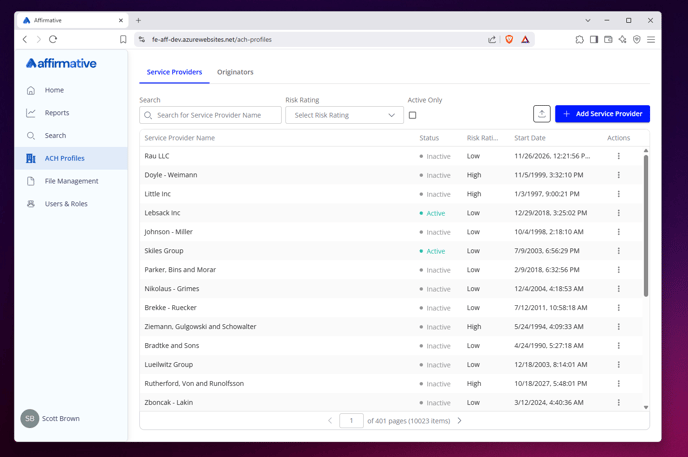
To view Service Provider profiles, click the ACH Profiles menu and select the Service Providers tab. A list of all Service Provider profiles will be displayed on screen.
Note: There will always be at least one Service Provider record in the system, created automatically when the platform is first brought online.
Export the Service Provider List
You can export a list of Service Providers to a CSV file by clicking the Export button in the upper-right corner of the screen. The exported file will include the following details:
- ID: The system generated identifier for the Service Provider.
- Name: The name given to the Service Provider as it appears on reporting
- Status: Active or Inactive
- StartDate: The date and time the Service Provider record was created
A file dialog box will appear, allowing you to choose where to save the CSV file.
Searching Service Providers
By default, the Service Providers screen displays all active profiles in the system. To refine your search, use the filters at the top of the screen:
- Search – Enter keywords to search by Service Provider name.
- Risk Rating – Filter by the Service Provider’s assigned risk rating.
- Active Only – Check or uncheck this box to toggle between showing all or only active Service Providers.
- Start Date – Filter your service provider list to find profiles created between two given dates.
Adding New Service Providers
To create a new Service Provider profile, click the Add New button in the upper-right corner of the Service Providers screen. A blank profile form will appear.
Fill out the required fields, make any optional selections, and click Save at the bottom of the screen when you're finished.
Profile Details
Each Service Provider profile requires the following information:
- Service Provider Name – This name will appear in system dropdown menus and reports wherever the Service Provider is referenced. (Required)
- Risk Rating – Use this optional field to classify the risk associated with the Originators grouped under this Service Provider.
You may enter:
- Descriptive labels (e.g., High, Medium, Low), or
- Numeric values (e.g., 1–5 or 1–10).
The rating system is flexible and should align with your organization’s risk framework.
SEC Codes
This section allows you to define which Standard Entry Class (SEC) codes the Service Provider is authorized to use. This is optional.
- To authorize an SEC code, check the corresponding box in the Debit or Credit column.
- To access additional SEC codes, click the More SEC Codes option to expand the full list.
💡Tip: Use this section to limit which transaction types each Service Provider can initiate.